Device Core Parameters (DC:)
Device parameters follow this syntax:
DC:[name of the core1]/[device ID]/[name of parameter]/[dimension1 index]/[dimension2 index]/...:Modifiers
The device ID and dimension values can be set in different ways, as they are Parameter References themselves, meaning they can be Variables, Behavior Fields, or any other reference. If the reference includes slashes (/), it must be wrapped in curly braces {}.
Examples: DC:bmd-atem/{Var:DeviceIndex}/AuxSource/{Var:AuxChannel}/
This references AUX sources on the ATEM switcher with Device ID found in "Var:DeviceIndex" and the AUX Channel denoted by "Var:AuxChannel". In this case, wrapping the nested Parameter Reference is not required, as there are no forward slashes that might interfere with parsing, but it improves readability to do so.
Selecting multiple devices or dimensions:
To address multiple devices or dimension values at once, you can use array syntax with brackets [ ] or the all keyword:
-
Array syntax: List specific indices separated by commas. Example:
DC:protocol-visca/[1,2,3,4,5]/dcCruiseControl/ -
allkeyword: Select all available devices on a core or all values of a dimension. Example:DC:protocol-visca/all/dcCruiseControl/(all devices) Example:DC:protocol-visca/1/fader_Channel/all(all dimension values)
Using all is particularly useful when you want to trigger an action across all devices of a core without having to enumerate each device index manually.
Understanding Dimensions
Some device parameters have one or more dimensions, which represent additional indices needed to fully address the parameter. For example, on a Blackmagic ATEM switcher, the AUX source parameter has a dimension for the AUX channel number, because each AUX output can be set independently.
When you select a parameter that has dimensions, extra fields will appear in the Parameter Reference helper window below the parameter selection:
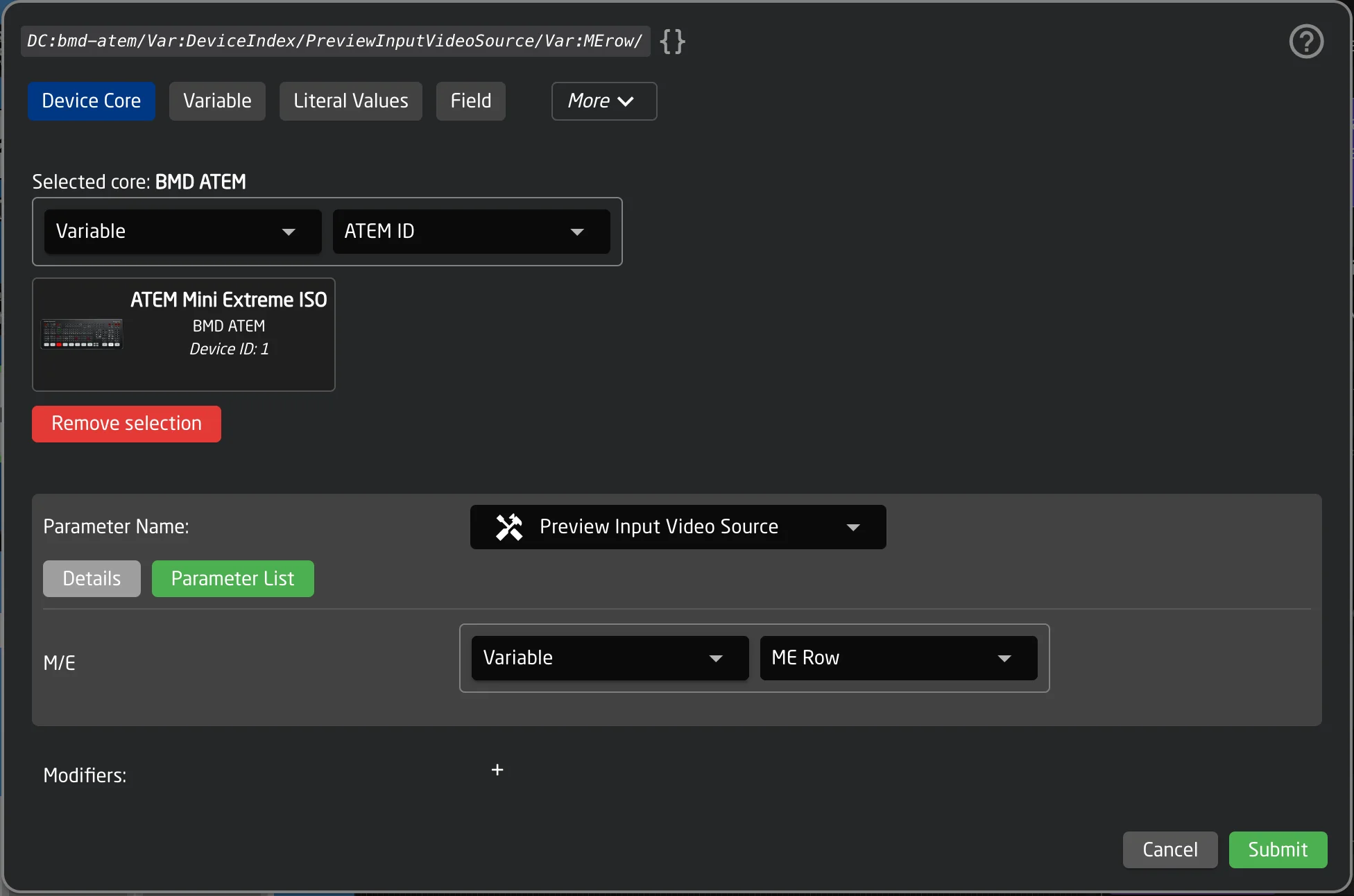
Each dimension has a name and a description. The value for each dimension is itself a Parameter Reference, meaning you can use a literal number, a Variable, a Field, or any other reference type to dynamically select which index to address.
Example with one dimension:
DC:bmd-atem/1/AuxSource/1/ — addresses AUX Source on ATEM device 1, AUX channel 1.
DC:bmd-atem/1/AuxSource/{Var:AuxChannel}/ — uses the variable "AuxChannel" to dynamically select which AUX channel to address.
Example with multiple dimensions:
Some parameters have more than one dimension. For instance, a keyer parameter on an ATEM may have both an M/E (Mix/Effect) dimension and a USK (Upstream Keyer) dimension:
DC:bmd-atem/1/KeyOnAir/1/1/ — M/E 1, Upstream Keyer 1.
In the helper window, you will see a separate field for each dimension, labeled with its name and description.
The DimensionName modifier can be used to retrieve the human-readable name of a dimension or one of its elements. See the General Modifiers table for details.
Meta Values
Certain device core parameters require additional configuration data beyond the parameter value itself. These are called Meta Values. They provide extra context that the device core needs when setting a value on the device.
Meta Values are most commonly found on protocol-based device cores like MQTT and HTTP, where additional details such as a topic, URL path, or request type are needed alongside the value being sent.
Unlike dimensions, Meta Values do not appear in the Parameter Reference string itself. They are configured separately in the helper window.
When you select a parameter that has Meta Values, the helper window will show additional fields below the parameter and dimension fields:
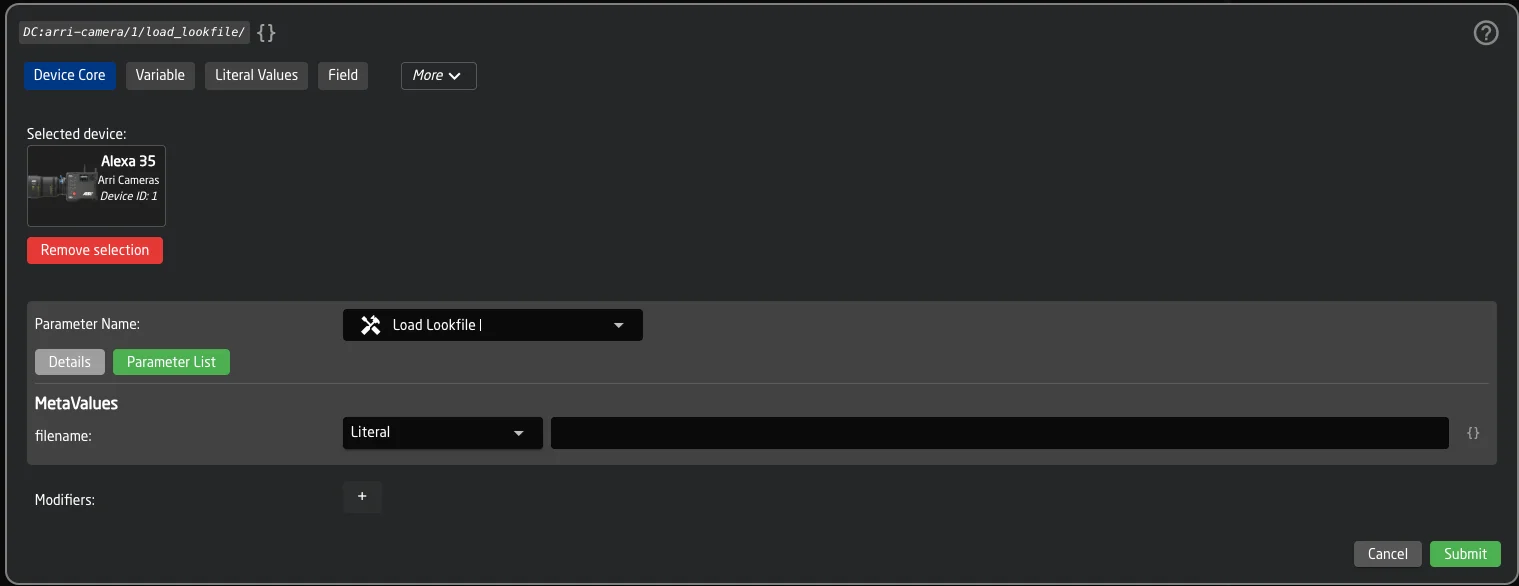
Depending on the type, each Meta Value field may be:
- A text input (String)
- A number input (Integer or Float)
- A true/false toggle (Boolean)
- A dropdown with predefined options (Options)
Examples:
The MQTT protocol core's "Publish" parameter has three Meta Values:
- topic (required) — The MQTT topic to publish to.
- value (required) — The message payload.
- retain — Whether the message should be retained by the broker (true/false).
The HTTP protocol core's trigger parameter has Meta Values for:
- Path — The URL path for the request.
- Request Type — A dropdown to select GET, POST, PUT, PATCH, or DELETE.
- Body — The request body (for POST/PUT/PATCH).
- Header — Custom HTTP headers.
Using dynamic values in Meta Values
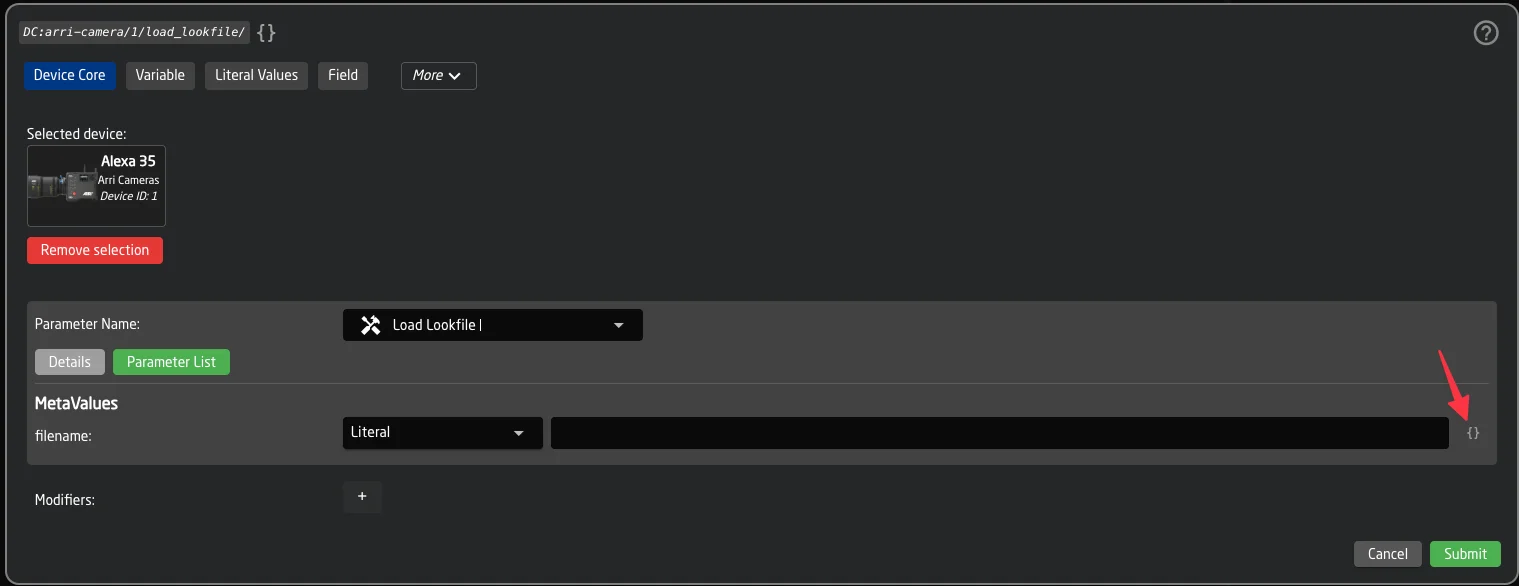
Each Meta Value field supports two input modes:
- Simple mode (default): Works like a standard Parameter Reference selector — you can choose a literal value, a Variable, a Field, or any other reference type.
- Template mode: Toggled via the { } (code-braces) button next to the field. This allows you to mix free text with embedded Parameter References, for example
Prefix: {Var:Topic}or{DC:core/1/param/}. This works identically to Feedback text templating. The button turns yellow when template mode is active.
Meta Values in the Inspector
When a behavior uses a parameter with Meta Values, the configured values are visible in the behavior inspector alongside the parameter name.
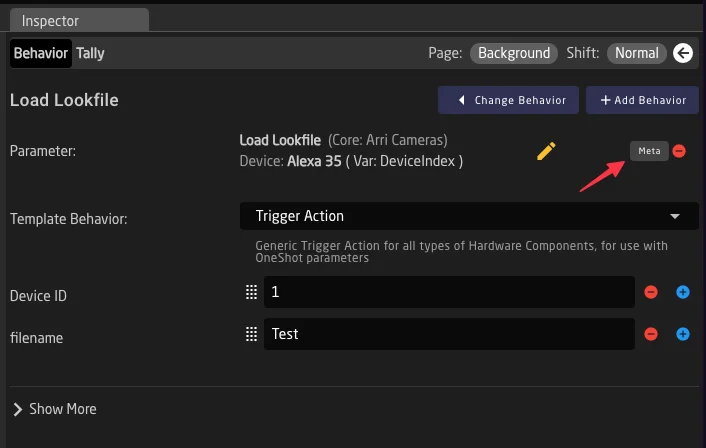
Meta Values only affect how values are sent to the device. They do not change how values are read or displayed.
Tip: Using Meta Values in raw JSON
Tip: Using Meta Values in raw JSON
In the raw JSON configuration, Meta Values are stored under the "MetaValues" key inside the Parameter Reference object. In preset state values, they appear under the key "MetaMap".
-
without core- prefix ↩